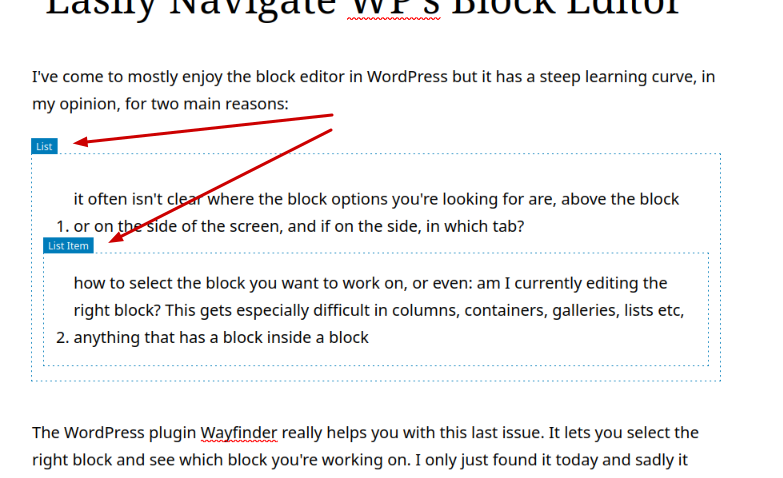
I’ve come to mostly enjoy the block editor in WordPress but it has a steep learning curve, in my opinion, for two main reasons:
- it often isn’t clear where the block options you’re looking for are, above the block or on the side of the screen, and if on the side, in which tab?
- how to select the block you want to work on, or even: am I currently editing the right block? This gets especially difficult in columns, containers, galleries, lists etc, anything that has a block inside a block
The WordPress plugin Wayfinder really helps you with this last issue. It lets you select the right block and see which block you’re working on. I only just found it today and sadly it hasn’t been updated in a year but for now it’s still working. I’m using it on WP 6.9.4 without problems.
It has a few simple settings and I turn off the option to show block classes because that makes it a bit too cluttered for me, but then it’s absolutely perfect. I highly recommend using it for clients who want to do some simple content updates themselves and for anyone who wants to take the guesswork out of trying to select a column or a gallery and click on the right element in one go.
Try this plugin and if you like it, leave it a review in the WP plugin repository, so the developer will know there is still an interest for what this lovely little plugin can do.